

4.9. Extensions#
Extension: Doubly Linked List
Complete the provided
DoublyLinkedListclass that implements a doubly-linked list.A doubly-linked list contains nodes with two references, one in each direction. This means that all nodes in a doubly-linked list link to the next and previous nodes. This allows traversal in both directions of the list.
Doubly-linked lists usually hold references to both the head and the tail nodes. When there’s only one element the head and the tail node are the same node.
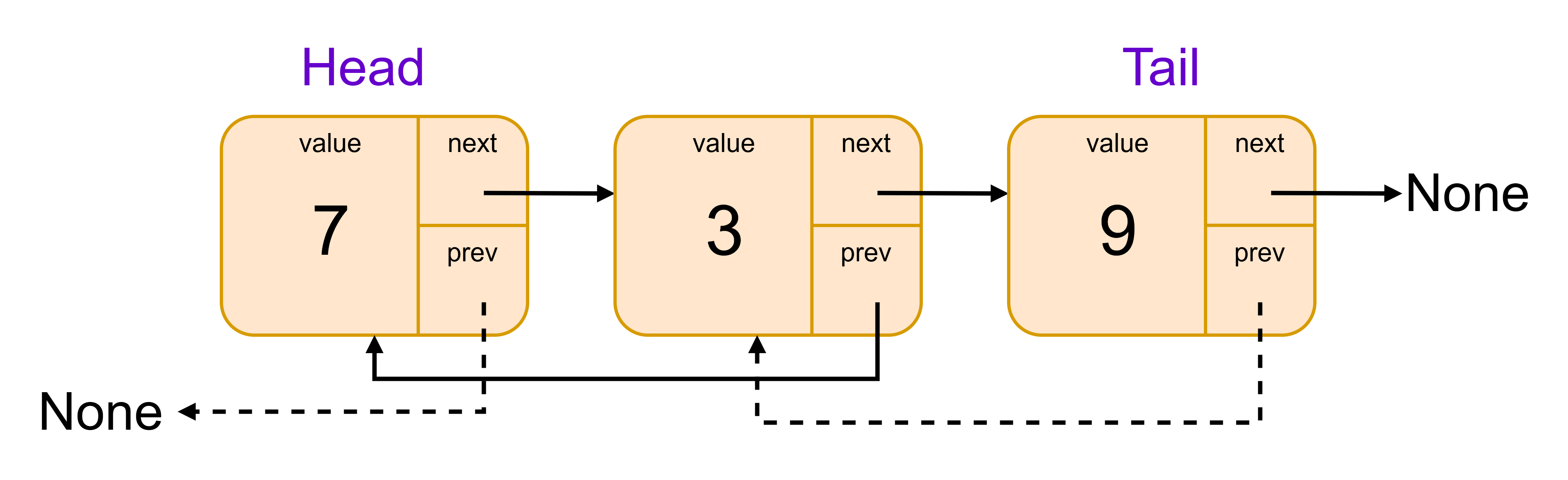
DoublyLinkedList Specifications
Attributes
head, a reference to the first element in the list
tail, a reference to the last element in the listMethods
retrieve(self, index), return element at positionindex
prepend(self, data), adddatato the start of the list and returnNone
append(self, data), adddatato the end of the list and returnNoneInstructions
Note
Look for the
TODOitems in the provided code!
Review the
Nodeclass and observe theprevandnextattributesReview the
prependmethod to understand the logic ofheadandtailattributesComplete the
appendmethod:
Create a new tail node with the provided value
If there is one or more element in the list then assign the new tail to the existing tail’s
nextOtherwise set the
headattribute to the new tail objectAssign the new tail node to the
tailattributeUsage Example
>>> names = LinkedList()
>>> names.append("Bill Gates")
>>> names.append("Steve Jobs")
>>> print(names.retrieve(1))
Steve Jobs
Here is some code for you to start with:
class Node:
    def __init__(self, data, prev=None, next=None):
        self.data = data
        self.prev = prev
        self.next = next

    def __str__(self):
        return str(self.data)


class LinkedList:
    def __init__(self):
        self.head = None
        self.tail = None

    # Get element at index (same as before)
    def retrieve(self, index):
        counter = 0
        current = self.head
        while current is not None and counter < index:
            current = current.next
            counter += 1
        if current is None:
            return None
        return current.data

    # Add element to the start of the list
    def prepend(self, data):
        new_node = Node(data, prev=None, next=self.head)
        if self.head:
            self.head.prev = new_node
        else:
            # list was empty so tail must also point here
            self.tail = new_node
        self.head = new_node

    # Add element to the end of the list
    def append(self, data):

        # TODO

# Test code
names = LinkedList()

names.append("Turnbull")
names.append("Morrison")
names.prepend("Albanese")

print(names.retrieve(1))
Solution
Solution is locked
Extension: Queue
Complete the provided
Queueclass that implements a Queue using a doubly-linked list.Queues are data structures that store data using the first in first out (FIFO) principle. The information stored in the queue first will be the first out during ‘dequeue’.

Dueue SublyLinkedList Specifications
Attributes
head, a reference to the first element in the queue
tail, a reference to the last element in the queueMethods
enqueue(self, data), add a single element to the queue
dequeue(self, data), remove a single element from the queueInstructions
Note
Look for the
TODOitems in the provided code!
Review the
enqueuemethod to understand the logicComplete the
dequeuemethod:
Store the
head.datatemporarilyMove the
headto the next elementUpdate the new
head.prevtoNoneIf necessary update
tailReturn the stored
dataUsage Example
>>> names = LinkedList()
>>> names.append("Bill Gates")
>>> names.append("Steve Jobs")
>>> print(names.retrieve(1))
Steve Jobs
Here is some code for you to start with:
class Node:
    def __init__(self, data, prev=None, next=None):
        self.data = data
        self.prev = prev
        self.next = next

    def __str__(self):
        return str(self.data)


class Queue:
    def __init__(self):
        self.head = None  # front of the queue
        self.tail = None  # back of the queue

    def enqueue(self, data):
        new_node = Node(data, prev=self.tail, next=None)
        if self.tail:
            self.tail.next = new_node
        else:
            # queue was empty so head must also point here
            self.head = new_node
        self.tail = new_node

    def dequeue(self):
        if self.head is None:
            return None

        # TODO


# Test code
names = Queue()
names.enqueue("Bill Gates")
names.enqueue("Steve Jobs")
print(names.dequeue())
print(names.dequeue())
Solution
Solution is locked
Extension: Better Linked List
This exercise builds upon the “Linked List” exercise.
LinkedList Specification
Extend your LinkedList class so that it supports the following functions:
__str__and__repr__, returns the string representation of the linked list. See required format in “usage example” below.
__len__, returns the number of items (nodes) in the linked list
__getitem__, returns the value of the node given an index
__setitem__, sets the value of the node at a given indexUsage Example
>>> names = LinkedList()
>>> names.append("Turnbull")
>>> names.append("Morrison")
>>> names.append("Albanese")
>>> print(names)
[Turnbull -> Morrison -> Albanese]
>>> len(names)
3
>>> names[1]
Morrison
>>> names[1] = "Michael McCormack"
>>> names
[Turnbull -> Michael McCormack -> Albanese]
Here is some code for you to start with:
# Definition of Node and enhanced LinkedList with requested functionality

class Node:
    def __init__(self, data, next=None):
        self.data = data
        self.next = next

    def __str__(self):
        return str(self.data)

class LinkedList:
    def __init__(self):
        self.head = None

    # Get element at index (existing method)
    def retrieve(self, index):
        counter = 0
        current = self.head
        while current is not None and counter < index:
            current = current.next
            counter += 1
        if current is None:
            return None
        return current.data

    # Add element to the start of the list (existing method)
    def prepend(self, data):
        node = Node(data, self.head)
        self.head = node

    # Add element to the end of the list (existing method)
    def append(self, data):
        new_node = Node(data, None)
        current = self.head
        if current is None:
            self.head = new_node
        else:
            while current.next is not None:
                current = current.next
            current.next = new_node

    def __len__(self):

        # TODO

    def __str__(self):

        # TODO

    __repr__ = __str__ # Use same string for repr and str

    def __getitem__(self, index):

        # TODO

    def __setitem__(self, index, value):

        # TODO


names = LinkedList()
names.append("Turnbull")
names.append("Morrison")
names.append("Albanese")

print("List contents:", names)
print("Length:", len(names))
print("Element at index 1:", names[1])

names[1] = "Michael McCormack"
print("List contents:", names)
Solution
Solution is locked